· 11 min read
Digital Tacho Manual Entry for UK Fleets: A Practical Guide
A practical UK guide to digital tacho manual entry covering when it is required, the fields to complete, common mistakes, and operator-licence evidence trails.

A driver calls from the M40 halfway through a Monday shift. The card wasn't inserted when the pool vehicle left the depot, and the vehicle unit had also been without power overnight. The driver has loaded, shunted and driven before realising the morning isn't fully recorded. The immediate question isn't which button to press. It's how to reconstruct the missing period so the driver record, vehicle-unit data, tachograph analysis and operator-licence file all tell the same story.
That's the practical meaning of digital tacho manual entry. It's a compliance backstop for a genuine recording gap, not a routine alternative to inserting the driver card and selecting the correct mode as work changes. The entry must reflect what happened, including other work, availability, rest and driving, because a tidy-looking record that doesn't match the driver's day is weak evidence at a roadside stop or DVSA follow-up.
Table of Contents
- When Digital Tacho Manual Entry Actually Applies
- The Rule-Sets Behind the Entry
- Fields, Modes and Codes to Complete
- Equipment Limits That Change the Workflow
- Linking Manual Entries to Downloads and Analysis
- Common Mistakes and How They Surface
- Evidence Storage and the Operator Licence File
When Digital Tacho Manual Entry Actually Applies
A manual entry is appropriate when the tachograph couldn't capture an activity at the time. Typical examples include a forgotten card insertion, a card fault, time spent away from the vehicle, a second-driver change, a mixed-fleet vehicle without the driver's card in the unit, or a period when the vehicle unit wasn't powered.
UK guidance says a digital or smart tachograph includes a manual input facility. Where the tachograph wasn't available when the activity took place, the permitted methods are an analogue record sheet, digital printout paper, or retrospective manual input when the card is next inserted. The driver's record still has to cover the complete duty period, but the missing section can be reconstructed through the tachograph's manual-entry workflow. GOV.UK guidance on tachograph rules for goods vehicles also makes clear that a driver doesn't need to duplicate activity on the driver card where everything has already been captured on an analogue record sheet.
Separate a genuine gap from normal recording
The first job is to establish what the driver did. Don't use manual entry to make an awkward shift appear compliant, and don't select rest simply because the vehicle was stationary. Loading, unloading, defect checks, coupling, paperwork and shunting are normally other work. A driver who had to remain available under known conditions may have a period of availability, while genuine break or rest requires the driver to be free from work.
A reliable reconstruction starts with the last recorded event before the card was removed or the unit stopped recording. It ends at card reinsertion or the point at which automatic recording resumes. Write down the times before touching the tachograph, then allocate every segment to the correct activity.
Practical rule: Reconstruct facts first, enter them second. Manual input is evidence of the duty period, not a tool for repairing an inconvenient compliance result.
The entry should be completed when the driver first returns to the vehicle and before driving resumes. If the driver has already driven without the card, the vehicle unit will hold unassigned movement that the operator must investigate. The driver should explain the circumstances using the available printout or record process, rather than assuming a late entry removes the issue.
For transport managers, the important point is continuity. The manual entry must later join the driver-card download, vehicle-unit download, analysis report and signed infringement or explanation record. That is the paperwork a DVSA examiner can follow, and it's the same chain a compliance analyst needs when reviewing a monthly pack.
The Rule-Sets Behind the Entry
A single gap can involve several legal frameworks. The tachograph records activity, but the meaning of that activity depends on the journey, the driver's work and the rules that apply to the operation.
For journeys within the scope of the assimilated drivers' hours regime, the relevant driving, break and rest rules sit under retained Regulation (EC) 561/2006 and, where applicable, AETR arrangements. A reconstruction must therefore show whether the driver was driving, working, available or resting, so the analyst can assess the applicable limits and breaks. The familiar 4.5-hour driving period before a qualifying break and the 9-hour daily driving limit can fall across a missing period, so an incorrect mode can alter the whole calculation.
GB domestic drivers' hours rules apply to many journeys carried out entirely within Great Britain. The same vehicle unit and symbols may be used, but the underlying rule set isn't automatically the same as the assimilated EU regime. The operator must know which rules govern that driver and journey before signing off the analysis.
The Road Transport (Working Time) Regulations 2005 add a separate layer. GOV.UK guidance, updated on 2 September 2022, states that Article 6(5) of retained Regulation (EC) 561/2006 requires manual records of all work, including out-of-scope driving and other work, together with periods of availability. The recognised methods are manual inputs on a digital or smart tachograph, or manual records on a record sheet or digital printout. GOV.UK guidance on recording other work also says a digital printout must identify the driver using the driver's name, driver-card number or driving-licence number.
Which rule-set governs which gap
| Gap type | AETR / EU 561 | GB domestic | RT(WT)R 2005 |
|---|---|---|---|
| Driving in an in-scope goods or passenger operation | Driving, breaks and rest are assessed under the applicable international or assimilated regime. | Apply where the journey falls within GB domestic rules. | Working-time implications may also apply. |
| Loading, unloading, defect checks or paperwork | Record the activity accurately so the duty record is complete. | Record the activity under the applicable domestic arrangement. | Treat as other work, not an assumed break. |
| Known waiting while available to resume work | The activity must be distinguished from rest. | Apply the relevant domestic interpretation. | Record availability where the conditions for it are met. |
| Out-of-scope driving or other duties | May sit outside the drivers' hours regime. | May be relevant to the domestic record. | GOV.UK guidance requires all work to be recorded. |
A manual entry can therefore be technically accepted by the tachograph and still expose a working-time problem. Logging availability as driving can distort the drivers' hours analysis, while logging working time as availability can understate actual work. The transport manager should review both the drivers' hours result and the RT(WT)R position before the record is closed.
Fields, Modes and Codes to Complete
The exact screen layout varies by make and model, but the logic is consistent. Insert the driver card, select the manual-entry function and work backwards through the uncovered period. The guide to operating a digital tachograph is useful for familiarising drivers with the menu flow before a live gap occurs.
Build the entry in time order
Start with the date and time when the first unrecorded activity began. Enter the date in DD/MM/YY format and the start time to the nearest minute, then choose the activity symbol. Continue by entering the time at which that activity ended and select the next mode. Include the location or country information requested by the unit, and check the driver identification details where the device or printout requires them.
The four core modes are:
- Driving: The steering-wheel symbol represents vehicle movement recorded as driving.
- Other work: The crossed-hammers symbol covers loading, unloading, checks, paperwork, shunting and other duties.
- Availability: The square with the diagonal line is used for a period when the driver is available but not carrying out work.
- Rest or break: The bed symbol is reserved for time when the driver is free from work and can dispose of the time as they choose.
Use the activity that describes the driver's actual duty, not the mode that makes the sequence look neat. A waiting driver who is still required to work or remain at the workstation hasn't automatically taken a break. Equally, a genuine break shouldn't be labelled other work just because the driver remained near the vehicle.
Worked reconstruction
Suppose the missing period runs from 06:30 to 09:15. The driver loaded for 15 minutes, then drove for 1 hour and 45 minutes, and took a 45-minute rest before the card was reinserted. The entry should split the period into separate activities:
- 06:30 to 06:45, other work, for loading.
- 06:45 to 08:30, driving, for the journey.
- 08:30 to 09:15, rest, for the genuine break.
Don't enter 06:30 to 09:15 as one block of rest, and don't mark the loading as availability. The analyst needs the individual segments to assess the driver's duty accurately and reconcile the sequence with the vehicle unit.
The tachograph will ask the driver to confirm the entry. Review every segment, accept it only when the times and symbols are correct, then print if the unit prompts for a printout or if the operator's procedure requires supporting evidence. If the driver spots an error, the correction must be recorded properly. Industry guidance advises making a signed printout correction record where a manual entry is wrong or the mode switch wasn't used correctly, because the correction becomes part of the evidence trail. The Logistics UK guidance on correcting tachograph records explains that point in operational terms.
Complete the entry on the day the driver returns to the vehicle. A manual entry left until later is harder to verify and can leave the driver travelling with an unexplained gap.
Equipment Limits That Change the Workflow
A driver can know exactly what happened and still encounter a hardware restriction. Digital tachographs don't accept unlimited retrospective activity, and the permitted window depends on the unit and its software.
The documented benchmark for the Stoneridge SE5000 is up to 16 manual entries in each 24-hour period. That matters in multi-drop or split-duty work where a driver repeatedly removes and reinserts the card. The same guidance describes VDO units as allowing manual input for the period between the previous card withdrawal and the next insertion. The Stoneridge and VDO driver guide sets out the equipment-specific behaviour.
Stoneridge SE5000 versus VDO DTCO
| Limit | Stoneridge SE5000 | VDO DTCO |
|---|---|---|
| Manual-entry capacity | Documented benchmark of up to 16 entries in each 24-hour period. | Manual entry is described for the period between the previous withdrawal and next insertion. |
| Operational concern | Repeated removals and insertions can consume the available entry capacity. | The permitted reconstruction window can restrict what the driver can enter. |
| Driver response | Reconstruct the duty before starting and avoid leaving several periods to the end of the shift. | Confirm the previous withdrawal and next insertion times before beginning. |
| Escalation | Use a printout or record-sheet process if the unit can't accept the required information. | Don't force an incomplete entry. Preserve the explanation and supporting record. |
The practical lesson is to identify the vehicle-unit make before a driver needs it. Fleet engineers and transport managers should include the tachograph model in driver instructions, especially where a pool vehicle or relief vehicle is likely to be used.
Don't assume an accepted screen means the record is complete. A download and analysis review remain necessary, particularly when the unit rejects a period, creates an overlap or leaves an unexplained interval. If the hardware won't accept the full reconstruction, the driver must preserve the permitted paper or printout evidence and report the problem through the operator's process.
Linking Manual Entries to Downloads and Analysis
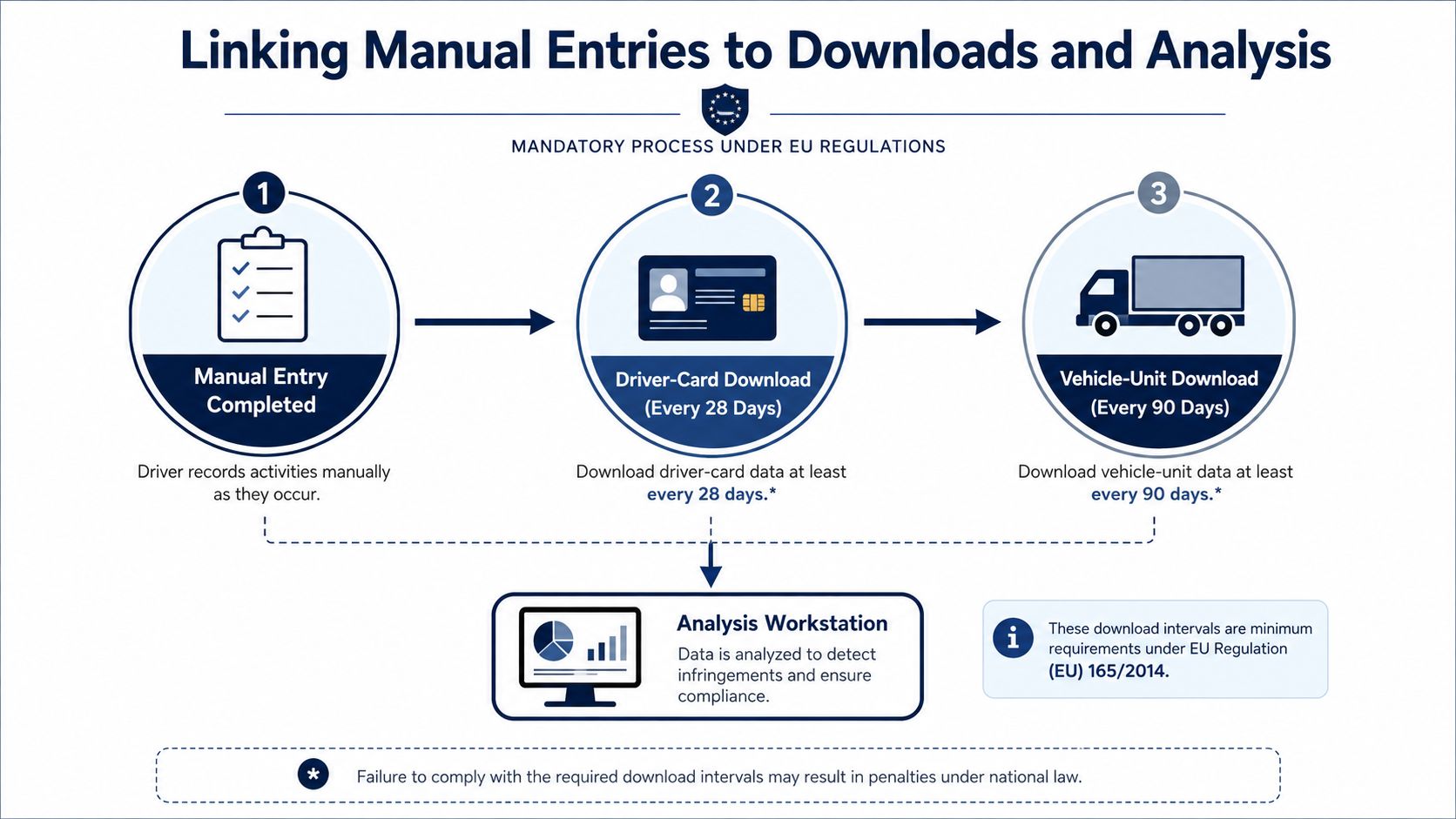
A manual entry has value only when the surrounding data supports it. The driver-card download should be scheduled at least every 28 days, while the vehicle-unit download should be completed at least every 90 days, as set out in UK legislation and operator guidance. The legislation confirming the 90-day vehicle-unit download interval is the source to keep in the compliance file when setting the download calendar.
Make the join deliberate
When the files arrive, the analyst should overlay the driver-card activity and vehicle-unit records. Start by checking that the reconstructed period begins when the driver started duty, then confirm that the first automatic vehicle-unit event after reinsertion follows the manual entry without an unexplained overlap.
A practical reconciliation looks like this:
- Match the opening: Compare the manual-entry start time with the card removal, insertion or first duty evidence.
- Check the transition: Confirm the first recorded driving event after reinsertion doesn't overlap the manually entered driving block.
- Review the end of the shift: Compare the closing vehicle information with the next driver's insertion and the vehicle's recorded activity.
- Resolve exceptions: Mark unexplained movement, overlapping driving, missing rest or incorrect modes for transport-manager investigation.
- Sign off the result: Keep the analyst's conclusion with the infringement report, driver explanation and any correction printout.
The operator must retain tachograph-related records and produce them to enforcement officers for 12 months, according to GOV.UK tachograph guidance. That retention period makes the download calendar more than an administrative reminder. It gives the operator a defensible record of what was received, analysed, corrected and signed.
A central system can also help connect tachograph files with wider fleet evidence. Where a business needs structured system-to-system exchange, an open API for smart fleet integration can provide technical context for connecting fleet data, but the operator still needs a human review and sign-off process.
For teams comparing platforms, tachograph analysis software for operator compliance should be assessed against t
digital tacho manual entryUK tachograph compliancedriver card downloadsoperator licence undertakingstachograph analysis