· 10 min read
How to Check OCRS Score for UK Operator Licence Holders
Learn how to check OCRS score, understand your DVSA risk rating, and what to do if the data looks wrong. Practical steps for UK operators.
A transport manager opens the DVSA operator compliance page on Monday morning and sees a traffic examiner is due that week. The immediate question is usually, “What's our OCRS score?” The more useful questions are what each score means, whether the underlying data is accurate, and whether the maintenance, driver and tachograph evidence supports the position shown.
This guide explains how to check OCRS score information, interpret the roadworthiness, traffic and combined results, challenge errors, and connect the score with the controls that protect an operator licence. It's written for UK goods vehicle and PSV operators who need records that can withstand a DVSA intervention or Traffic Commissioner scrutiny, not just a colour on a screen.
Table of Contents
- What the OCRS Score Actually Is
- Who Can Access Your OCRS Data and How
- Reading the Roadworthiness, Traffic and Combined Scores
- What to Do When Your OCRS Data Looks Wrong
- The Compliance Evidence Behind the Score
- How Routine Habits Move the Score Over Time
- Pulling It Together and Next Steps
What the OCRS Score Actually Is
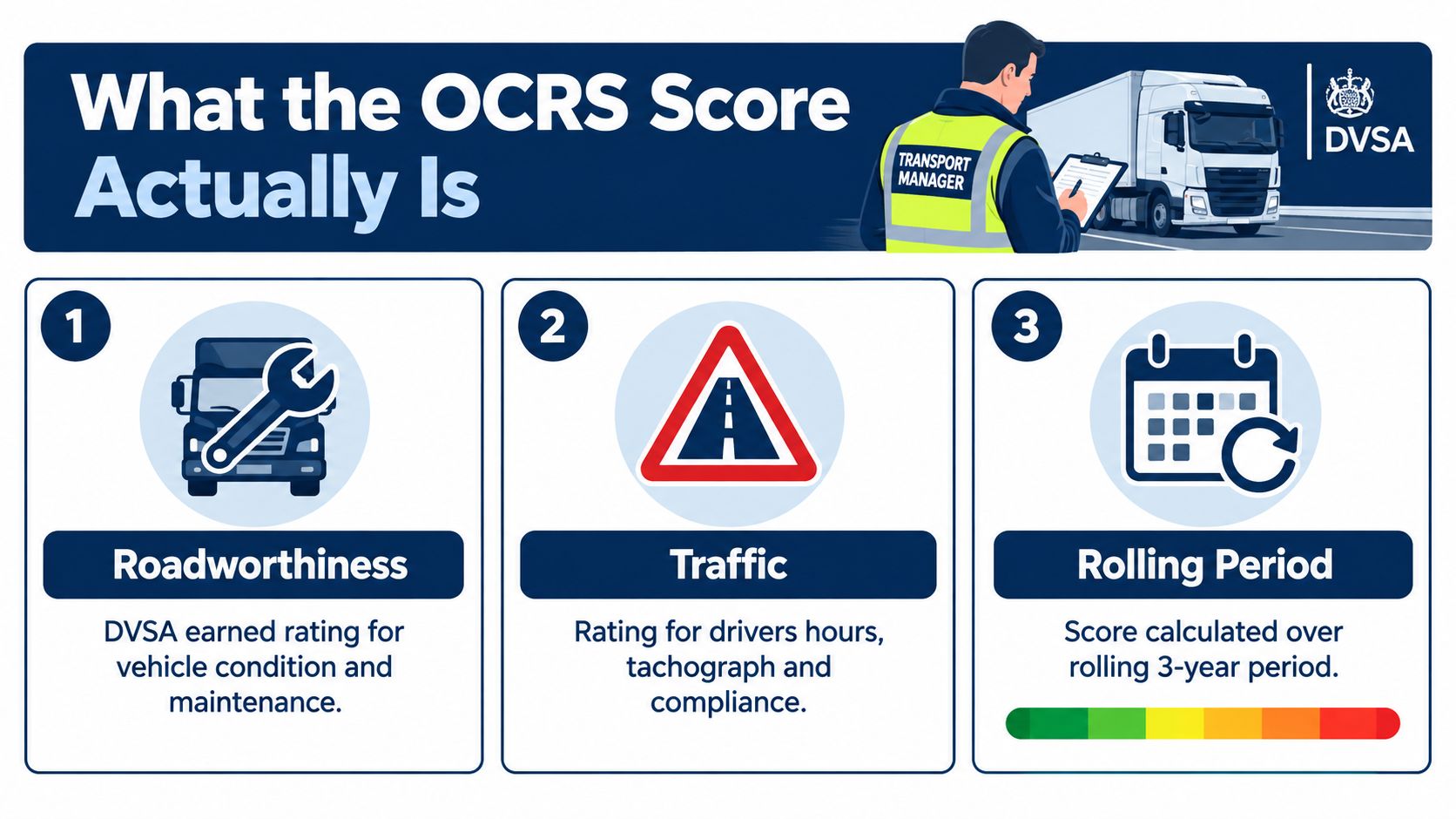
The Operator Compliance Risk Score, or OCRS, is a DVSA risk-rating system. It helps DVSA decide which operators are more likely to be stopped for roadside checks. It isn't a pass or fail test, and it isn't proof that an operator is compliant just because the displayed position looks favourable.
DVSA uses a three-year rolling period and produces separate roadworthiness, traffic and combined scores. The underlying information can include annual tests, roadside inspections, site visits, desk-based assessments, prosecutions and related enforcement history, as set out in the official DVSA OCRS guidance. An operator may have no score at all where DVSA has no relevant data from the past three years.
Treat the colour as a prompt, not a verdict
The report is a management signal. A less favourable result should trigger a review of prohibitions, inspection findings, defect rectification, drivers' hours control and the records supporting your operator licence undertakings. A favourable result doesn't excuse missed safety inspections, weak walkaround checks, late tachograph downloads or undocumented driver licence monitoring.
Practical rule: Check the score before you need to explain it. A last-minute review rarely produces a complete evidence trail.
OCRS also sits within a wider regulatory picture. DVSA and the Traffic Commissioner can consider the operator's maintenance system, transport manager control, licence records, Earned Recognition arrangements where applicable, GV262 reviews and public inquiry history. The score is therefore one indicator among several, not a public-facing customer rating or a complete assessment of the business.
Who Can Access Your OCRS Data and How
Access starts with the operator licence record. The licence holder can view the report, and nominated transport managers or an authorised representative can act for the operator where the account and permissions are properly connected. The practical blocker is often not the score itself, but an account that isn't linked to the correct licence.
You'll need a GOV.UK One Login linked to the operator's Government Gateway account, plus the operator licence number. Search GOV.UK for “view your OCRS report”, select Start now, sign in, choose the relevant operator licence and load the report.
The report is tied to the operator's GB licence records. The DVSA guidance explains that the service shows OCRS data for the most recent licence, so information connected to previous entities or licences may need to be requested separately. Don't assume a company name change, licence transfer or historic entity will automatically appear in the same view.
Resolve access problems before interpreting results
Common access problems include:
- Unlinked accounts: The user has GOV.UK access, but it isn't connected to the operator licence.
- Incorrect operator details: Company names or licence information don't match the DVSA record.
- Incomplete transport manager details: The nominated transport manager information hasn't been recorded correctly.
- Multiple licences: A user selects the wrong licence and reviews the wrong fleet position.
If you manage several licences, consolidate the reports and record the date each one was checked. OperatorCompliance can bring the same DVSA feed into a single dashboard for multi-licence fleets, alongside recurring compliance dates and evidence workflows. That can reduce the risk of reviewing one licence while another develops a problem.
For a practical walkthrough, use the official GOV.UK service for viewing your OCRS report. The service is the source of the report. Your internal system should preserve what you saw, when you saw it and what action followed.
The dashboard is easier to understand when you know what each component represents. This short video gives a visual introduction before you start comparing the results with your own inspection and traffic records.
Reading the Roadworthiness, Traffic and Combined Scores
The report gives you three separate views of risk. Roadworthiness relates to vehicle condition and maintenance history. Traffic relates to traffic compliance activity. Combined brings those areas together.
DVSA says the score can draw on annual tests, roadside inspections, site visits, desk-based assessments, prosecutions and related enforcement history. Read the result alongside your own evidence. If a vehicle has a prohibition recorded, your maintenance file should show the defect, assessment, repair, authorisation and return-to-service decision.
What each score tells you
- Roadworthiness score: Use this to investigate safety inspection planning, annual test outcomes, walkaround defect reporting, brake evidence and repairs. Trailers must be included, not just powered vehicles.
- Traffic score: Review drivers' hours, tachograph analysis, infringement sign-off, loading controls and driver competence records. A clean maintenance file won't compensate for unmanaged traffic offences.
- Combined score: Treat this as the overall management warning. It can expose an operation that performs adequately in one area while failing to control another.
The colour bands are commonly presented as green for lower risk, amber for medium risk, red for higher risk and grey where there isn't enough information to produce a meaningful score. Don't attach an invented numerical threshold to a colour. DVSA's system is based on the data available for the operator and its rolling period, and the correct response is to examine the underlying events rather than chase a band in isolation.
| Colour band | Score range | Likely DVSA action |
|---|---|---|
| Green | Lower-risk position | Continue routine control and monitor emerging events |
| Amber | Medium-risk position | Review recurring findings and strengthen weak controls |
| Red | Higher-risk position | Expect closer regulatory attention and prepare evidence |
| Grey | Insufficient data | Build reliable records and review future events carefully |
A grey position isn't a clean bill of health. It means the system doesn't have enough data to score the operator. For general background on vehicle condition and maintenance principles, vehicle safety for learner drivers provides useful introductory context, although operator-licence holders must rely on the specific commercial vehicle guidance that applies to their fleets.
Keep a dated copy of each review and compare it with your OCRS score explained guide. The key question is whether the pattern of events matches the controls you say you operate.
What to Do When Your OCRS Data Looks Wrong
Treat questionable data as a records problem until you've tested it. A sudden change doesn't automatically mean the business has deteriorated permanently. DVSA explains that the rolling period can change because older encounters drop out while new events are added.
Start with the vehicle list. Check every registration shown against the current operator licence, fleet register and disposal records. Look for vehicles that were sold, removed from the licence, re-registered or incorrectly associated with the operator.
Build an evidence-led correction request
Run the relevant DVSA MOT and service history reports and identify whether the event happened while the vehicle was under your control. A historic defect may relate to a previous operator or keeper, so your response needs dates and documents, not an assertion that the report is wrong.
Then check traffic incidents against driver employment records, vehicle allocation and journey information. Confirm whether the named driver worked for you on the event date and whether the vehicle was operated under your licence.
Create one correction schedule containing:
- Registration and event date: Identify the vehicle and the exact recorded event.
- Evidence reference: Link the point to a test record, invoice, disposal document, employment record or other supporting document.
- Operator position: State why the event appears incorrectly attributed or needs clarification.
- OCRS report date: Preserve the version you reviewed.
If the issue remains unresolved, email operator.reports@dvsa.gov.uk. DVSA says to include the operator licence number, a copy of the incorrect OCRS report and supporting documents. Keep the sent email, attachments and any response in the compliance file.
Don't delete the disputed event from your internal review. Mark it as challenged and retain the evidence. If DVSA doesn't amend the record, the documented dispute can be raised during a later intervention or Public Inquiry as part of your evidence. The DVSA guidance on using the OCRS system sets out the official route and the checks operators should complete first.
The Compliance Evidence Behind the Score
OCRS doesn't exist separately from the operator's control system. It reflects events that should already be connected to maintenance records, tachograph management, driver monitoring and corrective action.
For tachographs, Traffic Commissioner statutory guidance states that, where appropriate, operators should download and store vehicle digital tachograph unit data at least every 90 days, and drivers' tachograph smart-card data at least every 28 days. The source is the Traffic Commissioner statutory document for transport managers. The files must be available, analysed and acted on. Downloading a file without reviewing infringements is document collection, not compliance management.
Keep the evidence chain intact
Safety inspection records for UK goods and passenger operators must be kept for at least 15 months, including records for vehicles removed from the operator licence or sold or otherwise disposed of. Electronic defect records are acceptable if they remain available for the same retention period. The DVSA Guide to Maintaining Roadworthiness also treats inspection and repair work, whether completed in-house or by a contractor, as part of the vehicle's maintenance history.
For PSV operators, the GOV.UK public service vehicle operator licensing guide reinforces the need to retain maintenance records and produce them to the Traffic Commissioner if asked. Keep calibration information, test dates, repair records, defect reports and inspection outcomes together. A file that proves the inspection but not the repair is incomplete.
| Evidence stream | Retention period | OCRS sub-score affected |
|---|---|---|
| Tachograph downloads and analysis | Store and manage data so drivers' hours evidence can be produced when requested | Traffic |
| Safety inspections and repairs | At least 15 months | Roadworthiness |
| Defect and prohibition records | Retain with the relevant maintenance history | Roadworthiness and combined |
| Driver compliance records | Keep according to the applicable regulatory and business control requirements | Traffic |
Driver licence entitlement, CPC status and tachograph-card validity belong in the same control picture. Store consent or mandate evidence where licence checks are carried out, record the result and escalate anything that affects the driver's ability to operate.
Use a single operator licence maintenance records system or a disciplined folder structure. During a desk-based assessment, the question is simple: can the transport manager produce the right document quickly and explain what happened after an exception?
How Routine Habits Move the Score Over Time
A representative mixed fleet illustrates the point better than a colour chart. Assume a standard national operator licence holder runs HGVs and trailers, starts with inconsistent defect reporting and has no reliable review rhythm. The transport manager doesn't attempt a single dramatic fix. Instead, they establish repeatable controls.
The first habit is a walkaround and defect process that records what the driver found, how the defect was assessed and who authorised the vehicle to continue. The second is a tachograph calendar that separates vehicle-unit downloads from driver-card downloads, sends alerts before deadlines and records analysis and sign-off. The third is a maintenance planner that shows upcoming safety inspections and brake-related evidence requirements rather than relying on workshop memory.
A better OCRS position comes from controlling the next event, then the next one after that.
The operational sequence matters
When drivers report defects before departure, engineers can assess them before DVSA finds them at the roadside. When tachograph analysis identifies repeated hours or loading issues, the transport manager can brief the relevant driver and retain the signed follow-up. When an inspection is missed, the exception is visible instead of being buried in a spreadsheet.
The rolling period means historic events don't disappear simply because a new process has been introduced. Improvement therefore depends on consistency. A corrected vehicle file, one training conversation or one late download won't transform the whole record, but each properly controlled event strengthens the evidence that the system is working.
Monthly compliance packs can help management see whether inspections, walkarounds, downloads, driver credentials and open defects are moving in the right direction. The pack should be reviewed by a named person, with actions assigned and closed, rather than filed unread.
Pulling It Together and Next Steps
Checki
OCRS scoreDVSA complianceoperator licence UKrisk ratingcompliance check