· 17 min read
Tachograph Card Readers: The Operator's Practical Guide
A practical UK operator's guide to tachograph card readers — legal download duties, choosing the right hardware, and getting data into your compliance file.

You know the scene. A driver's card is still in a wallet, the vehicle's last download is older than you'd like, and someone in the office is asking whether the file is “on the system somewhere”. Then a DVSA visit lands, or the Traffic Commissioner wants a clean trail after an incident, and suddenly the issue isn't the reader on the desk. It's whether the evidence chain holds up.
That's why tachograph card readers matter. They're not a convenience gadget. They're the point where driver activity, vehicle-unit data, and company control get turned into files you can defend in front of an examiner, an auditor, or a hearing. If the download is late, unsigned, mismatched, or never makes it into the right archive, the hardware has already done its job and still failed the operator.
Table of Contents
- Why Tachograph Card Readers Decide Whether Your Licence Survives a Visit
- The Legal Map Behind Every Card Reader Download
- Choosing the Right Tachograph Card Reader for Your Depot
- Setting Up and Running Downloads Without Losing Data
- Turning Downloads Into Evidence That Actually Stands Up
- Feeding Downloads Into OperationalCompliance and Your TC File
- A One-Page Operator Cadence That Keeps You Ahead of DVSA
Why Tachograph Card Readers Decide Whether Your Licence Survives a Visit
A lot of fleets treat the reader as if it's just the bit of kit that sits beside the laptop. That mindset causes trouble. The reader is the first practical gate in the compliance chain, because it's where raw card or vehicle-unit data becomes something the business can retain, review, and produce later.
The failure usually starts before the inspector arrives
The common breakdowns are ordinary ones. A driver card doesn't get pulled on time, a vehicle unit download is missed, a company card never gets used to access the vehicle-unit data, or a file sits on a local PC and never reaches the evidence folder. When that happens, the issue isn't just administrative tidiness, it's that the record can stop being complete enough for enforcement scrutiny.
The legal foundation is simple enough, even if the workflow in a depot often isn't. Digital tachograph cards became the UK's operational standard after EU rules paved the way in 1998, and they became mandatory for new vehicles that required tachographs from 1 May 2006 (legislation.gov.uk). That shift replaced paper-chart thinking with a card-based evidence chain, where the driver card, company card, workshop card, and control card each carry a different role. A weak reader breaks that chain right at the beginning.
Practical rule: if the download file never gets off the reader PC and into your controlled archive, you don't really have evidence, you have a local copy waiting to go missing.
What the Traffic Commissioner and DVSA care about
They care less about the brand of reader and more about whether the business can produce the right file, for the right period, with a defensible history behind it. That's why card readers sit upstream of the compliance work, not beside it. Once the file has been captured, it needs to be signed, checked, retained, and traceable in the same way as any other operator-licence record.
This is also where systems like OperatorCompliance matter in practice, because the downloaded files need a controlled landing place, not a loose desktop folder with no audit trail. The reader is the intake point, but the evidence lives or dies on what happens after the card is inserted, authenticated, and downloaded. If the workflow ends at “the card has been read”, the operator's done half a job and nothing more.
The Legal Map Behind Every Card Reader Download
A card reader becomes a compliance tool the moment it captures evidence that may later be requested by DVSA or the Traffic Commissioner. The hardware is only the entry point. The process must identify the card, extract the right file, meet the download deadline, and place the result somewhere the operator can review and produce.
Four cards, four jobs
A driver card belongs to the individual driver and carries their activity record. A company card is the operator's key, used to access and download vehicle-unit data, but it does not store the driving data itself. A workshop card supports approved calibration and technical work. A control card lets DVSA and police access data for enforcement.
Those roles affect how the reader is used. “The card download” is too vague for a reliable depot procedure. Driver-card and vehicle-unit downloads are related, but they are different tasks. The company card enables access to the vehicle unit for proper extraction, so its custody, availability, and expiry need to form part of the control process. A large group may also need more than one branch or depot to manage credentials. The earlier UK government reference covers the relevant card arrangements without needing to be repeated here.
The deadlines that shape the workflow
Driver card data must be downloaded every 28 days, and vehicle-unit data every 90 days in the system described. Tachograph records must be kept for at least 12 months. The driver card has an average memory capacity of 28 working days, so a missed download can allow older activity to be overwritten before the gap is spotted. A driver digital tachograph card is valid for 5 years, and company cards have the same 5-year validity.
| UK tachograph download duties at a glance | |||
|---|---|---|---|
| Card or Source | Minimum Download Cadence | Retention Period | What It Proves |
| Driver card | Every 28 days | At least 12 months | Driver activity history and hours evidence |
| Vehicle unit data | Every 90 days | At least 12 months | Vehicle-based tachograph activity and downloads |
| Company card | Used to access and download VU data | Held as part of the evidence chain | Operator control over the data extraction process |
| Workshop card | As required for calibration work | Held with technical records | Approved maintenance and calibration activity |
The reader gets data out before the deadline. It does not, by itself, prove that the operator has discharged its wider duties. The downloaded file still needs to reach the controlled system, remain available for review, and connect to the records used in a DVSA inspection or Traffic Commissioner case.
Use the tachograph download rules at 28 and 90 days to set the cadence in the operating calendar. Put responsibility against each download, record exceptions, and check that vehicle-unit and driver-card schedules are being met. OperationalCompliance provides the landing point for downloaded files, giving the reader workflow somewhere controlled to send its output instead of leaving it on a depot computer.
Route type and evidence purpose can change the practical record produced. Domestic GB work, coach and bus operations, and international goods work do not all create the same compliance questions, even though the reader performs the same basic capture task. DVSA will still look for a file that is complete, attributable, and retrievable when requested.
Choosing the Right Tachograph Card Reader for Your Depot
The right reader depends on the job you expect it to do every week, not on the box it came in. A depot that only ever pulls driver cards at a desk has a different need from a mixed fleet with workshop bays, yard moves, and drivers who are rarely in the office at the same time as admin staff.
Match the hardware to the data source
A smartcard reader handles chip-based driver cards, which is the standard desk-side setup for many offices. Vehicle-unit downloads are different, because they usually need a company card plus a separate download device or cable, often through a 6-pin or front-panel connection. In practice, most operators end up needing both, because one tool captures driver activity and the other extracts vehicle-unit evidence.
That's where buying purely on spec sheets goes wrong. A compact USB reader might be fine for driver-card downloads at a desk, but it won't solve a vehicle-unit workflow on its own. Likewise, a bulkier download kit might work well in a workshop, but it's overkill if your admin team only needs a simple desktop routine.
The practical comparison is less about “which is better” and more about “which failure mode hurts less”. USB desktop readers are tidy and easy to control, while Bluetooth and WiFi readers can help if drivers need to swipe in the yard, at the gate, or from a workshop area. The trade-off is obvious. More convenience can mean more chance of someone saying they'll do it later and then forgetting.
Practical rule: if a reader depends on a driver remembering a later step, assume that step will be missed unless the process is forced into the depot routine.
Security, ruggedness, and generation support
A good depot reader should protect personal data, survive rough handling, and clearly support the tachograph generation you run. For UK and GB compliance, that means compatibility with second-generation cards and adherence to ISO/IEC 7816 contact and signaling standards (legislation.gov.uk). The same specification requires the recording equipment to read card data needed to verify the last session, compute continuous driving time, and calculate cumulative break and driving times across the previous and current week, so this is about more than basic file transfer.
The hardware side also needs to store at least 88 card records (legislation.gov.uk). That doesn't make a reader “smart” on its own, but it does show why compatibility and reliability matter when an operator expects the device to sit in a real depot environment, not a showroom.

The decision point is simple enough. Count the drivers, count the vehicles, and ask where the drivers are when downloads need to happen. If the answer is “not reliably in the office”, then convenience features matter, but only if they're paired with a process that still forces the file into a controlled archive.
For a useful remote-download comparison, the overview at tacho remote download helps frame where depot readers stop and wider capture workflows begin. That's the key judgment: the reader should fit the workflow, not the other way round.
Setting Up and Running Downloads Without Losing Data
The download itself should be routine. If it feels fragile every time, the setup is wrong or the process has too many manual points. A depot admin shouldn't have to improvise just to get a clean .DDD file out of a card or vehicle unit.
Start with the PC, not the card
A stable workstation matters because the reader is only as reliable as the machine it sits on. Get the drivers installed, confirm the software has the right permissions, and make sure the transfer isn't being interrupted by a laptop that's asleep, unmanaged, or stripped of admin rights. For a basic walkthrough of digital tachograph operation, the practical steps in how to operate a digital tachograph are a sensible reference point.
Driver cards are straightforward when the contacts are clean and the process is disciplined. Insert the card chip-first, authenticate, and let the software pull the activity record before it gets archived. Vehicle-unit downloads need the company card plus the proper cable or front-port connection, and that's where teams often rush and create partial transfers.
The errors that derail real teams
Three failed PIN attempts can lock the card session, dirty contacts can trigger a “card not recognised” response, and pulling a vehicle-unit file while the engine is still running can leave you with incomplete data. Interrupted transfers are worse than a visible error because they can leave you with a file that appears normal until someone tries to rely on it later.
The housekeeping step is the one many fleets skip. Rename the file before it leaves the reader software, using the driver name, vehicle registration, and date. If you wait until it's already buried in a shared folder, someone will eventually file it under the wrong person or overwrite it with the next quarter's extract.
- Prep the PC properly: confirm the software opens cleanly, the reader driver loads, and the transfer path is working before anyone inserts a card.
- Check the card and contacts: a quick wipe and a correct chip-first insert prevents a surprising amount of wasted time.
- Treat the transfer as finished only when the file is named and saved: if it's still called something generic, it's not ready for compliance review.

The best setup is boring. The same device, the same port, the same naming rule, the same archive location. Every extra variation gives the depot another way to lose data before anyone even gets to the analysis stage.
Turning Downloads Into Evidence That Actually Stands Up
The download isn't the hard bit. The hard bit is making sure the file is still useful when somebody asks for it months later, and that means signing, retention, access control, and a traceable archive.
Unsigned files don't carry much weight
A signed tachograph file is different from a random export sitting on a desktop. If the digital signature is missing or the file's chain of custody is unclear, the examiner can treat it as weak evidence even if the raw data looks fine. The point is not that the file exists, but that the operator can show where it came from and how it was handled.
Retention is where businesses get complacent. Driver card data needs to be kept for at least 12 months, and the same minimum applies to vehicle-unit data in the working rule set described earlier (BVRLA guidance). On some records, the privacy policy allows a longer hold period, and the UK government notes that tachograph data can overlap with Working Time Regulations evidence, which can extend retention to 24 months in some cases (DVLA privacy policy). That's not a hardware problem, it's a records-management decision.
Keep the storage controlled
Shared network drives without audit logging are a poor answer. Emailed .DDD attachments can be quarantined or lost in mail rules. Backups that overwrite the previous quarter can destroy the only clean copy you had. The files need a storage location that is controlled, searchable, and restricted to the people who need access.
A useful model is simple. One original copy, one working copy, and a clear rule about who can touch each. That's the difference between an archive and a pile of downloads. If your business uses a platform like OperatorCompliance, the local reader output becomes the intake point, and the controlled archive becomes the place where the evidence is reviewed and retained.
A good parallel for operators thinking beyond tachograph hardware is a contract-style view of data handling, such as Datenverträge für Fahrdaten implementieren. The point isn't the branding. It's the discipline of defining what data comes in, who can use it, and how long it stays usable.
| Retention and access rules for downloaded tachograph files | |||
|---|---|---|---|
| File type | Minimum retention | Storage location | Access control |
| Driver card file | At least 12 months | Controlled compliance archive | Restricted to compliance and authorised admin staff |
| Vehicle-unit file | At least 12 months | Controlled compliance archive | Restricted to compliance and authorised admin staff |
| Working-copy analysis file | As needed for review | Secure analysis workspace | Analysts and nominated reviewers only |
Unsigned or poorly stored files don't usually fail because the data is absent. They fail because nobody can prove the business handled them properly.
The Traffic Commissioner tends to care less about whether the folder tree looks tidy and more about whether the operator can show a coherent record, with dates, access, and sign-off aligned. That's the standard to work to, because tidy alone won't save a weak audit trail.
Feeding Downloads Into OperationalCompliance and Your TC File
A clean file is only useful once it lands in the right place and gets checked against the rest of the fleet record. That's where the value of the download chain really shows up, because the reader output becomes part of an operator's larger evidence pack.
How the file gets from depot to review
The practical routes are usually drag-and-drop from the local reader PC, a scheduled inbox for automated collection, or an API feed for larger fleets. Once the file arrives, the platform checks integrity, matches driver and vehicle data, and flags missing calendar days so someone can deal with the gap before it becomes an inspection problem.
That review step matters more than many managers admit. A file can be technically present and still be operationally useless if it doesn't line up with the driver roster, the vehicle assignment, or the working time record. When analysts review the data, they're not just checking for infringements, they're checking for unexplained absence, broken sequences, and patterns that don't fit the rest of the evidence.
What gets examined after upload
The sensible order is: confirm the file is valid, check the card or vehicle match, review driving time infringements, inspect for missing swipes, and compare what the tachograph says against rota and working time evidence. That's the difference between simple storage and genuine compliance management.
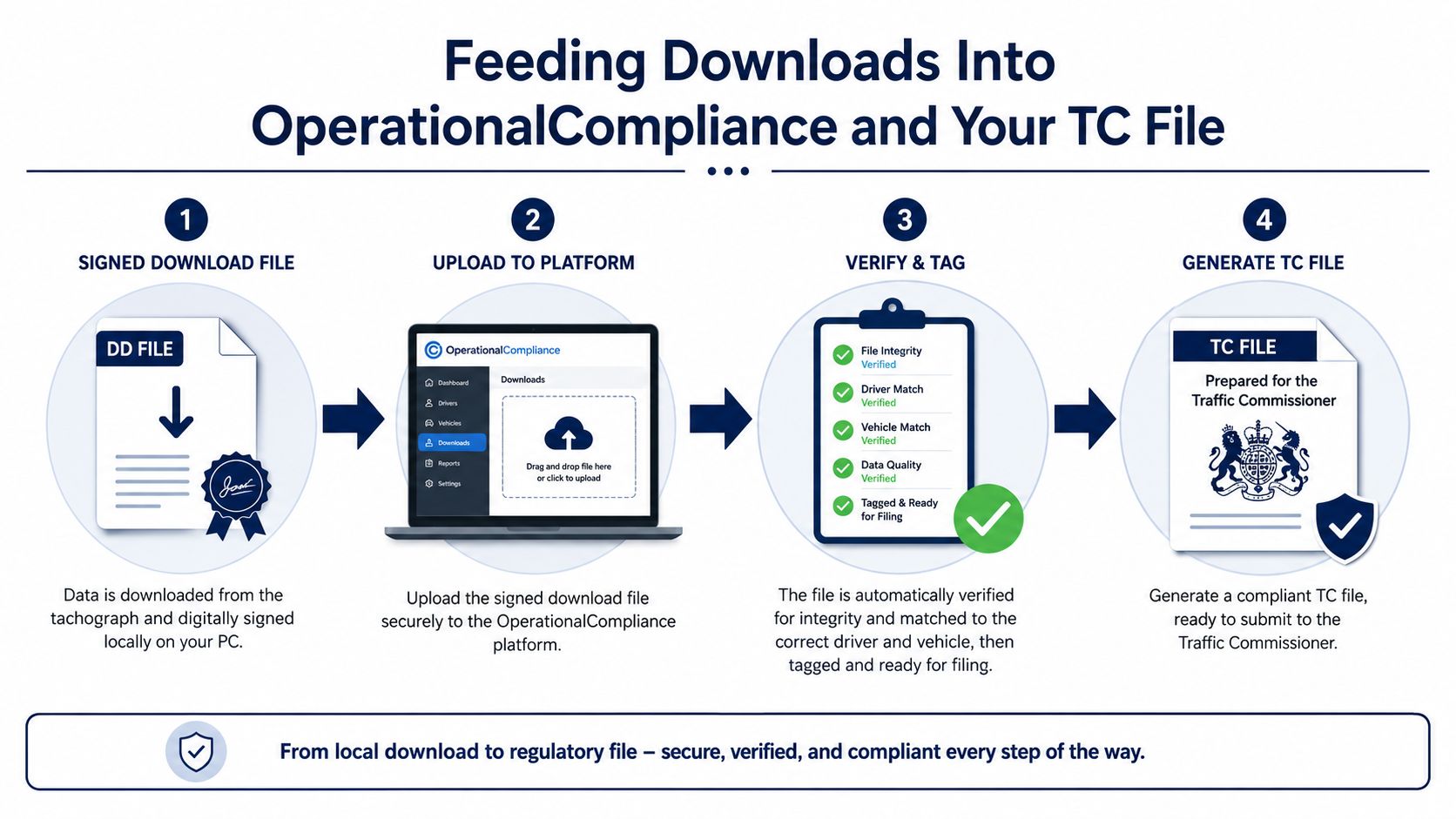
The outputs the operator needs are the ones that travel well in an audit. Monthly compliance packs, driver history reports, and a consolidated TC export are more useful than a scatter of raw files because they show a path from download to review to retention. That makes the original reader file traceable from depot device all the way to the evidence bundle.
What a TC-ready file should be able to show
- Source traceability: which card or vehicle produced the file, and when it was downloaded.
- Review history: who looked at the data and what they flagged.
- Retention continuity: that the file still exists in a controlled archive.
- Export discipline: that the evidence can be produced in a format the hearing or visit needs.
Once that chain is intact, the reader stops being a standalone device and becomes part of the operator's control system. That's the standard to aim for, because the device itself never gets inspected on its own. The record around it does.
A One-Page Operator Cadence That Keeps You Ahead of DVSA
A clear cadence prevents the familiar depot scramble: a missing driver card, an overdue vehicle download, and an evidence request arriving before anyone has checked the archive. The card reader is only the entry point. The control chain must carry each download into review, retention, and the operator's Traffic Commissioner file.
The routine that sticks
Use a fixed monthly pattern that the depot can follow without relying on memory. Week one is for driver card pulls. The first Monday of each month is for vehicle-unit downloads. Each week, check card validity and identify cards nearing expiry or returned with an incomplete transfer. Each month, back up the archive and check for gaps. Once a year, review the full process against the compliance file and the business's operating pattern.
Assign ownership beside every task. One person signs the chain-of-custody record, another maintains the TC evidence folder, and a named manager chases any card not returned by the required deadline. If a reader fails during a shift, the fallback reader, company card, and transfer route should already be identified. Improvising during a failed download is how gaps enter the record.
Red flags that keep returning
Unsigned files need correction before they reach the archive. Missing archive periods need investigation, not a note to revisit later. Late driver returns create avoidable pressure, particularly when a fleet waits until a card is close to full. Missing second-driver slots can indicate that drivers are not using the tachograph consistently, so record the exception and follow up with the individual.
Keep the wall sheet focused on actions:
- Driver card pulls: confirm the download completed and the file name identifies the driver and date.
- Vehicle-unit downloads: verify that the company card was used and the transfer completed.
- Archive checks: confirm the latest quarter remains present, readable, and backed up.
- Exception chasing: log late cards, partial transfers, and unreviewed infringements as soon as they are found.
The review record belongs with the downloaded file. Store the original reader output, the reviewer's action, and any follow-up in OperationalCompliance, then retain the resulting evidence with the TC file. That gives DVSA a traceable route from card or vehicle download to management action, rather than a folder of unexplained files.
Repetition is the point. Once each person knows what happens on each date, the reader becomes part of depot control and the compliance chain is less likely to fail during a visit.
If you want the download process, evidence storage, reminders, and TC pack under one roof, visit OperatorCompliance and see how the platform handles tachograph file intake alongside the rest of your operator-licence records. It suits operators tired of chasing missing files, late downloads, and fragmented evidence when an inspection lands.
tachograph card readerstachograph downloadsfleet complianceDVSA rulesoperator licence